Exporting SQL Server Data using BCP Utility

Problem

Develop a solution that automates the process of exporting specific data from a Microsoft SQL Server database to a CSV file using the BCP utility. The solution should allow to specify the database, table, fields, and destination file path as inputs, and generate the CSV file with the desired data automatically.

Introduction:

In today’s data-driven world, the ability to export data from databases is crucial for various purposes, such as analysis, reporting, and sharing information. One popular tool for exporting data from Microsoft SQL Server is the Bulk Copy Program (BCP) utility. In this blog post, we will explore a step-by-step guide on how to use the BCP utility to export data from a SQL Server database and save it to a CSV file.

Step 1: Understanding the BCP Utility

BCP is a command-line tool provided by Microsoft SQL Server. It allows you to import and export large amounts of data between SQL Server databases and external files. With BCP, you can control the format and structure of the exported data, making it versatile for various data export needs.

Step 2: Setting Up the Command

Let’s break down the follwing bcp command and understand its components:bcp "select fldName, fldValue from [DBNAME].[dbo].[tblName]" queryout "Q:\Jeevan\exportdata.csv" -c -t, -S DBServer -T

  • bcp: The command itself that invokes the BCP utility.
  • "select fldName, fldValue from [DBNAME].[dbo].[tblName]": The SQL query that selects the desired fields from the table you specified. Replace [DBNAME][dbo], and [tblName] with the actual database, schema, and table names, respectively.
  • queryout: Specifies that the BCP utility should export the data from the SQL query.
  • "Q:\Jeevan\exportdata.csv": The file path and name of the output CSV file. Modify it to the desired location and filename.
  • -c: Specifies that the data should be exported in a character format.
  • -t,: Specifies the field terminator character to be a comma (,) in this case.
  • -S DBServer: Specifies the SQL Server instance or server name where the database resides. Replace DBServer with the appropriate server name or connection string.
  • -T: Specifies that the BCP utility should use Windows Authentication for the connection.

Step 3: Executing the Command

To execute the BCP command, follow these steps:

  1. Open the Command Prompt or your preferred command-line interface.
  2. Navigate to the directory where the BCP utility is located. By default, it can be found in the SQL Server installation directory under the “Tools\Binn” folder (ex. C:\Program Files\Microsoft SQL Server\Client SDK\ODBC\170\Tools\Binn). IF PATH variable is configures bcp caommand can be executed anywhere
  3. Copy and paste the modified BCP command into the command-line interface.
  4. Press Enter to execute the command.

Step 4: Verifying the Exported Data

Once the BCP command is executed successfully, navigate to the file path specified in the command ("Q:\Jeevan\exportdata.csv" in the provided command) to find the exported CSV file. Open the file using a spreadsheet application or a text editor to verify the exported data.

Key features of bcp

  1. High-performance data transfer: BCP is designed for high-speed data transfer between SQL Server and external files. It can handle large volumes of data quickly and efficiently.
  2. Command-line interface: BCP is a command-line tool, which allows for automation and scripting of data import/export operations. It can be easily integrated into batch files or used within scripts for seamless data processing.
  3. Flexible data formats: BCP supports various data formats, including delimited text files, fixed-width text files, native SQL Server binary files, and XML format. This flexibility enables importing and exporting data in a format that best suits your needs.
  4. Customizable field and row terminators: BCP allows you to specify custom field and row terminators when importing or exporting data. This is particularly useful when working with non-standard or special characters in your data.
  5. Data transformations: BCP provides options for transforming data during the import or export process. You can define custom transformations using format files, which allow you to map data columns, skip columns, apply data conversions, and handle special data formats.
  6. Batch size control: BCP allows you to control the batch size when importing or exporting data. You can specify the number of rows per batch, which helps optimize performance and manage memory usage.
  7. Error handling and logging: BCP provides options to handle errors during data transfer and log error messages to a specified file. This enables you to track and troubleshoot any issues that may occur during the import or export process.
  8. Security features: BCP supports authentication and encryption options to ensure secure data transfer. You can specify the login credentials and use SSL encryption for data protection.
  9. Integration with SQL Server features: BCP integrates well with other SQL Server features and components. It can be used in conjunction with SQL Server Integration Services (SSIS), SQL Server Agent, and other tools for comprehensive data management tasks.

These are some of the main features offered by the BCP utility. Depending on your specific use case, you can leverage these features to efficiently import or export data in bulk with Microsoft SQL Server.

Conclusion:

The BCP utility is a powerful tool for exporting data from SQL Server databases to external files. By following the step-by-step guide provided in this blog post, you can easily export data from your SQL Server database and save it to a CSV file. Remember to modify the command with your specific database, table, file path, and connection details to suit your requirements.

Calling web service from sql server using sql clr

Problem :

In my previous project I was been asked call web service from sql server stored procedure.

So I get it done using SQL CLR. So using CLR we can run managed code inside sql server.

Code that runs within the CLR is referred to as managed code.

We can create stored procedures, triggers, user defined types, and user-defined aggregates in managed code.

We can achieve significant performance increases because managed code compiles to native code prior to execution.

We can use SQL CLR in in SQL Server 2005 and later.

Why Sql CLR in sql server:

In some cases some tasks are not possible by T-SQL as my requirement.

So in that point we can go with SQL CLR.

What tools I have used in this post

Visual Studio 2015

Sql Server 2014

In Action:

  1. Create SQL Server Database project in VS 2015

newproj

  1. Add SQL CLR C# Stored Procedure

add-new-item

Name stored procedure As CallWebService

3. Add C# codes to Call Web service. I am using below web service to do test

http://www.webservicex.net/globalweather.asmx?op=GetCitiesByCountry


HttpWebRequest request = (HttpWebRequest)WebRequest.Create("http://www.webserviceX.NET//globalweather.asmx//GetCitiesByCountry?CountryName=Sri Lanka");

request.Method = "GET";

request.ContentLength = 0;

request.Credentials = CredentialCache.DefaultCredentials;

HttpWebResponse response = (HttpWebResponse)request.GetResponse();

Stream receiveStream = response.GetResponseStream();

// Pipes the stream to a higher level stream reader with the required encoding format.

StreamReader readStream = new StreamReader(receiveStream, Encoding.UTF8);

System.IO.File.WriteAllText("d://response.txt", readStream.ReadToEnd());

response.Close();

readStream.Close();

I am simply writing response to a text file.  You can do whatever in here.

4.Enable clr and set trust worthy on database. I am using AdventureWorks database


sp_configure 'show advanced options', 1;

GO

RECONFIGURE;

GO

sp_configure 'clr enabled', 1;

GO

RECONFIGURE;

GO

alter database [AdventureDatabase] set trustworthy on;

5. Build Visual Studio Project

Then it will generate dll in bin folder

6. Register assembly in Database.

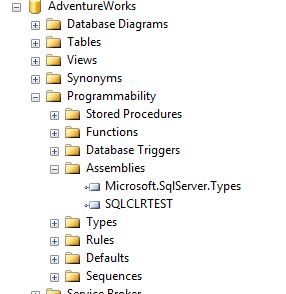
Go to AdventureWorks > Programmability > Assemblies

Right click on Assemblies and Click new Assembly

register-assembli

Set Permission to External access and browse for Our dll.  It is in bin folder of your project

Once you added we can see assembly registered in side Assemblies as below.

assembli

7. Create stored procedures to call assembly’s stored procedure

stored-procedure

Once you created a stored procedure you can see locked stored procedure.

locked-sp

8. So Now we have finished just execute the stored procedure. You can see text file is generated in drive

exec-sp

Source code

MERGE in Sql Server

From Sql server 2012 we can merge two tables. We can map data from one table to another table. If record exists can do a update and if not insert operation can be done.

Syntax


MERGE <target_table>
USING <table_source>
ON <Search>
WHEN MATCHED THEN UPDATE SET <set_clause>
WHEN NOT MATCHED THEN INSERT VALUES (<values_list>)

Create two tables and Insert some records


CREATE TABLE TargetTable([Id] INT, [Name] NVARCHAR(50))

CREATE TABLE SourceTable([Id] INT, [Name] NVARCHAR(50))

INSERT INTO TargetTable(Id,Name)
VALUES(1, 'John'), (2, 'Mezi'), (3, 'Tom')

INSERT INTO SourceTable(Id,Name)
VALUES(1, 'JohnNew'), (4, 'Peter'), (3, 'Tom-new')

Then do Merge


MERGE TargetTable AS T
USING SourceTable AS S
ON T.Id = S.Id
WHEN MATCHED THEN UPDATE SET T.Name = S.Name
WHEN NOT MATCHED THEN INSERT VALUES (S.Id, S.Name);

Now view TargetTable Data

merge


CHOOSE and IIF in Sql server

CHOOSE

  • Returns a list item based on its location
  • First parameter is index
  • Next parameters are list

SELECT CHOOSE(2,'item1','item2' )
-- this will return item2

SELECT CHOOSE(1,'item1','item2' )
-- this will return item1

SELECT
CHOOSE(1,[StandardCost],[ListPrice])
FROM [Production].[Product] p
WHERE p.ProductID = 680

--this will return StandardCost

IIF

  • Instant if
  • Three parameters
    • Boolean expression
    • Return value if true
    • Return value if false

SELECT IIF([ListPrice] > 0, [ListPrice], [StandardCost]) AS 'price'
FROM [Production].[Product] p
-- if ListPrice is greater than 0 it returns Listprice. Otherwise returns StandardCost

Sub Query in Sql

What is subquery?

Subquery is  just a query inside of a query.

Why Subquery?

  • Break down complex logic
  • Simplify reading

Subqueries can be replaced by joins. But some times Joins can be complex. Other thing is we are not allowed to put aggregates in WHERE. But we can put it aggreagates inside subquery .

Where to Use?

We can put sub queries in  three main places in query.

  • SELECT
  • FROM
  • WHERE

Using in SELECT

  • Access informations from tables  withing select query
  • Query must return a single(scalar) value

Creates a dynamic table. Useful for  breaking down queries. Query must be aliased.

Note : I have used Adventureworks 2012 database for following queries 


SELECT so.[SalesOrderID]
,so.OrderDate
,(SELECT COUNT([SalesOrderDetailID])
FROM [Sales].[SalesOrderDetail]sod
WHERE sod.SalesOrderID = so.SalesOrderID ) AS 'OrderLineCount'
FROM [Sales].[SalesOrderHeader] so

insideselect

Using with FROM


SELECT so.[SalesOrderID]
,so.OrderDate
,X.OrderQty AS 'TotalItems'
FROM [Sales].[SalesOrderHeader] so
INNER JOIN (SELECT
SUM([OrderQty]) AS 'OrderQty'
, [SalesOrderID]
FROM [Sales].[SalesOrderDetail] sod
GROUP BY [SalesOrderID]) AS X
ON so.[SalesOrderID] = X.[SalesOrderID]

infrom

With WHERE

Useful for comparing values from other tables

Predicates used with subqueries

IN

  • Confirm column value exist in subquery
  • Similar to inner join

SELECT [AccountNumber]
FROM [Sales].[Customer] sc
WHERE sc.CustomerID IN ( SELECT DISTINCT [CustomerID] FROM [Sales].[SalesOrderHeader] soh )

EXISTS

  • Returns true if subquery returns value
  • Used with correlated queries
Correlated subquery

Pass outer query column into subquery

</h4>
SELECT [AccountNumber]
FROM [Sales].[Customer] sc
WHERE EXISTS ( SELECT 1
FROM [Sales].[SalesOrderHeader] soh
WHERE sc.CustomerID = soh.CustomerID )

ALL

  • Compares column values to all items returned by subquery
  • Subquery must return only one column

ANY or SOME

  • Compare column value to any item returned by subquery
  • Subquery must return only one column
  • ANY and SOME are identical

SELECT [AccountNumber]
FROM [Sales].[Customer] sc
WHERE sc.CustomerID = ANY ( SELECT DISTINCT [CustomerID] FROM [Sales].[SalesOrderHeader] soh )


SELECT [AccountNumber] FROM [Sales].[Customer] sc

WHERE sc.CustomerID = SOME( SELECT DISTINCT [CustomerID] FROM [Sales].[SalesOrderHeader] soh )

Paging in sql server

It is best idea to do paging in server side. From Sql Server 2012 we have useful paging mechanism

We can use FETCH and OFFSET to paging in sql server.

FETCH -> indicates number of rows to retrieve

OFFSET-> indicates the number of rows to skip

Syntax for Paging

SELECT <columns>
FROM <tables>
ORDER BY<columns>
OFFSET x
FETCH NEXT y ROWS ONLY

x means number of record to skip and y means number of record to retrieve

Example

SELECT * 
FROM product 
ORDER BY productId 
OFFSET 20 ROWS 
FETCH NEXT 20 ROWS ONLY

In this it skips first 20 records and fetch next 20 rows

But in this some restrictions are there

  • ORDER BY is required
  • TOP is not allowed

CTE in sql server

CTE stands for Common Table Expression. It is introduced in sql server 2005.

Actualy it is not a terrible thing as we heard. We can consider it as inline view or temporary table.  CTE allows us to do exact same things like what we doing using views.

Benefits:

  • Breakdown complex queries
  • Avoid sub queires
  • Simply certain syntax

Syntax for CTE


WITH <cte name>[(columns)]

AS(

<SELECT statement>

)

Example

WITH SalesData(TotalSold,Year,Branch)
AS(
SELECT SUM(Total) AS 'TotalSold',
       YEAR(OrderDate) AS '[Year]',
       b.BranchName
 FROM Order o INNER JOIN 
 Branch b 
 ON o.branchId = b.branchId
 GROUP BY YEAR(OrderDate),b.BranchName
)

Then we can do any operations to SalesData CTE as we doing to a View.

Like : SELECT * FROM SalesData

Note: CTE column specifying is optional . if not specified it takes select query result columns

We can use it for short hand for sub-query. More over there are many other benefits in CTE. I noted a here very basic usage.